JS

Friday, June 20, 2008

The Internet as Personal Memory


Well, the Internet is going to become my audio/video/photographic memory. My flickr account lets me store my photos online. Soon I will start uploading videos to Google Video (or somewhere) so the whole world can watch my home movies....

You know, there's a touch of this in Bruce Sterling's short story, "Maneki Neko". It's a great story, and can be found in his anthology "A Good, Old-Fashioned Future".

I'm continuing my move to the use of all Open software. I have one Linux box up and running. It was rescued from a relative, had XP home on it, and was almost completely trashed by viruses. Since it came to me for free, I didn't feel like I was risking anything by formatting the disk and starting over.

Traffic Exchange - A great source of Traffic

Traffic Exchange - A great source of Traffic

Traffic exchange is basically a platform for those who want traffic, they do so by visiting each other's website, but not through giving links to each other. Everyone makes an account, sets up his website for traffic and then surfs the websites of others which are displayed in a frame. To me traffic exchanges are a great source of getting good visitors to the website.I am currently using two traffic Exchanges which I would advise others to join as well. They are the most easy to use. They are TrafficG and Fast Free Way.

You usually have to visit each visit for 15-30 seconds. After this you have to complete a human verification, this is to prevent bots from accumulating traffic. After this you will be paid about 0.5 visitors in the case of fast free way. So for every two websites you visit, you get one visitor in return, which is not bad at all. According to this after 30 minutes you can get 60 visitors to your website. They also have contest like referrals contest and clicking contest in which the winner gets free visits.

If anyone of you is lazy enough and cannot view websites to get visitors, then you can also purchase visitors, fast free way offers 1000 visitors for $10.00 . You can also save this money, if you can visit websites your self, this choice is yours. When you refer people to the website you get 20% visits to your website for the visits your referral has earned. This way you can get even more visits to your website.

Sunday, June 15, 2008

Orkut tips and tricks, Unblock Orkut, Bypass Restricted Sites

Proxut.com - orkut proxy

Proxut.com is a working orkut proxy. Yes, i am using that word “working” because so many proxy sites i have seen which claim to be a orkut proxy. But usually i couldn’t even login into orkut while using those proxy sites. The reason behind this is simple, orkut login is not regular login way, it consists of authentication at various levels. So all the proxy sites are not able to login into orkut while they still can access other social networking sites like myspac, bebo and other such sites.

So, i am satisfied with the way this orkut proxy works. With the help of proxut.com you wil be able to access orkut.com even in your colleges, schools and offices where it is blocked by the system administrator. Proxut still needs to change its server because sometimes it becomes slow, i can understand the high volumes of traffic they must be handling. In coming days they will be left be no other option but to take their orkut proxy to a new server. In the meanwhile the service is still great.


Myspace Unblocker

http://www.TempleOfTheDog.info Check out this great proxy. Click here: Myspace Unblocker to visit it. It is brand new and has a great design and is lightning fast!


Unblock Orkut, MySpace, Facebook & more via secure proxy!

https://www.zogler.com/ is a SSL-certified secure proxy, which means your information is kept safe and that filters have a harder time finding it. Works with Orkut, MySpace (vids!), Facebook, YouTube, etc. Great for either hiding your identity or just bypassing school/work firewalls.


UnblockEscape.com Unblocks Every Site...

http://www.unblockescape.com/ unblocks myspace, facebook, bebo, friendster, youtube etc. In short, now you can surf all the sites from anywhere, even where these sites are blocked like in offices, schools and colleges. Moreover, it helps you in protecting your privacy as your IP address remains hidden from everyone. So go on and enjoy.


Saturday, June 14, 2008

Web Development,Custom Web Design, Website Design, Website Development, Professional Web Design


Web Design

Web Development/Professional Website Design Books

  • Learning Web Design: A Beginner's Guide to HTML, Graphics, and Beyond - A guide for beginners to the art of learning Web design. Includes tips on what to do and what not to do,

    with a tutorial on building usable Web sites that covers information design, interface design, and navigation systems. Also covers HTML basics, images, and the use of software to enhance Web pages
  • Web Design in a Nutshell: A Desktop Quick Reference - This is the rare book for designers that is almost completely nonvisual. It doesn't show what's hip in navigational bars or what the coolest colors are. Rather, it gives readers the kind of know-how that can make a difference between someone who just whips up pretty pages with WYSIWYG applications like Dreamweaver and someone who can make those pages cross-platform, cross-browser, fast loading, and accessible to all.
  • Web Design For Dummies - Reference and guide to creating high-quality Web sites, for those with little or no experience. Explains the software and other tools needed to get started. The CD-ROM offers trial software and sample graphics from the text.


  • Web Design Garage - Learn how to construct cool and interactive Web sites with this hands-on guide to the world of Web design and usability. In this title from Prentice Hall PTR’s Garage Series, author Marc Campbell shows you the “ins and outs” of designing sites with HTML, JavaScript, and CSS as core technologies.

General Web Development/Professional Website Design Tips

  • Register your own domain name. Prefer .COM to other extensions.
  • Avoid Frames : You can't get good ranking in Serach Engines.
  • A lots of Animated Graphics: Simply irritate visitors.
  • custom web design / web development templates are freely available on many websites. Make use of them or you could use professional website design services available in market.
  • Dead Links : Frustrate visitors.
  • Test for cross-browser compatability.
  • Avoid latest trends and technologies. Many users may not have it or avoid downloading plug-ins.
  • KISS - Keep It Simple Sweet
  • Promote, update and maintain the site.

Web Graphics Tips

  • If possible use transparent GIF images
  • Smaller graphics size for faster download.
  • USe contrast - light and dark shades of the same color
  • Use web safe colors and anti-aliasing for images
  • Deifine 'width' and 'height' to declare image dimensions
  • Use 'ALT' tag to describe images - used by search engines.

Improve Memory With Simple Techniques


Improve memory easily? Yes, there really are some simple techniques, and you can start using them right now. Here are a few to get you started.

  1. Tell yourself to remember. When you first learn a person's name, for example, tell yourself, "remember that". This signals your unconscious mind to rank this input higher in importance.

  2. Know why you want to remember something. For example, to remember a person, think about how that person will be important to you in the future. If you want to remember fact about something, think about how you'll will need them someday.
  3. Visualize the future. Imagine where you'll see a person next, and anything you notice about them. Use this with the last technique. The additional associations will set the memory more firmly in your brain.
  4. Retrace your steps. When you forget something, like where you put your keys, you probably retrace your steps. This works, but try it in your mind, as if you were watching yourself from a distance. This can help keep you from blanking out parts of your route, as you did when you first set the keys down.
  5. Plan your memory. When you set down the keys on the chair, see yourself walking in and setting the keys on the chair. You could also quickly imagine someone asking where you put them and you answering "on the chair." You'll remember where they are if you do this.

Improve Memory With Proven "Tricks"

I went to a birthday party as a child. A party contest involved looking at a table covered in 15 various items for a few minutes. Then the things were taken away, and then we each got a piece


of paper and a pencil. We had to write down as many items as we could remember. I recalled seven or eight, but one little boy got all 15 items, and won the prize.

Years later I learned how he did it. His father taught him a simple technique that none of us other kids knew. The trick is to tie the items together in an imaginative story. Let's say you want to remember the following things: milk, soap, forks, honey, and flowers.

You create a story, and see it vividly in your head: At the bathroom sink, you reach for the soap, but the soap dish is filled with milk, so you wash your hands with that, then comb honey into your hair with a fork, pick up a bouquet of flowers and smile at yourself in the mirror. Repeat each item to yourself as you review this "movie" in your imagination, and you'll remember all five things, even the next day.

Create Good Memory Habits

Guess what the biggest problem with memory techniques is? Remembering to use them. Seriously, there are many great methods, but if you don't have the habit of using them, you'll forget to when you need them most. With any technique, make a conscious effort to use it until it becomes automatic. That's how to improve memory.

IT Interview Questions, Programming Interviews, Crack Interviews - (Indian IT Industry)


IT Interview Questions, Programming Interviews, Crack Interviews

This is the outcome of experience in this field. The information is useful especially for freshers. Sample question papers for software companies are provided.


I did not talk to anybody while preparing this page because there is nothing great about interviews. Take it easy...Be honest...polite...Don't try to pretend that you know everything...accept your mistakes ...Don't argue with interviews panel...I have seen many guys doing that...

Please don't send me mails asking for question papers of a particular company...or the answers of questions presented out here... Is it ethical to have a question paper before written exam?... it is upto you...I have nothing to say...

If you wish you can send your interview experience to share with us....Current Job scenario is pretty good... Make Hay While Sun Shines !...

Happy Job Hunting....

Basic Interview Preparation


General Interview Puzzles

Earlier I'd thought of giving a lots of puzzles. Actually the sites given below have everything if you follow the links given out there correctly. You need to face puzzle solving only if you are fresher.

Programming Puzzles - Job Interview Puzzles

Some companies certainly ask for these things. Specially Microsoft. Here are my favorite puzzles. Don't send me emails asking for the solutions.

  1. Write a "Hello World" program in 'C' without using a semicolon.
  2. Write a C++ program without using any loop (if, for, while etc) to print numbers from 1 to 100 and 100 to 1;
  3. C/C++ : Exchange two numbers without using a temporary variable.
  4. C/C++ : Find if the given number is a power of 2.
  5. C/C++ : Multiply x by 7 without using multiplication (*) operator.
  6. C/C++ : Write a function in different ways that will return f(7) = 4 and f(4) = 7
  7. Remove duplicates in array
  8. Finding if there is any loop inside linked list.
  9. Remove duplicates in an no key access database without using an array
  10. Convert (integer) number in binary without loops.
  11. Write a program whose printed output is an exact copy of the source. Needless to say, merely echoing the actual source file is not allowed.
  12. From a 'pool' of numbers (four '1's, four '2's .... four '6's), each player selects a number and adds it to the total. Once a number is used, it must be removed from the pool. The winner is the person whose number makes the total equal 31 exactly.
  13. Swap two numbers without using a third variable.
  14. Given an array (group) of numbers write all the possible sub groups of this group.


Interview Articles

Some cool interview articles...

Lateral Thinking Puzzles

There are not many puzzles on lateral thinking. My personal opinion...

These links are more than enough...

How to Manually Remove Viruses From Your System


Note: This solution will work only against those Viruses which does not infect Windows own Exe files e.g like explorer.exe

Virus Symptoms

You may have seen some unexpected things that should not happen. Some of the symptoms of viruses are:

Disables Task Manager

Disables Registry Editor

Disables Command Prompt

Sometime you have no application open but CPU usage goes over 50%

My Computer Drives not opening by Double Click

Automatic Shutdown

Computer Slows down

Hidden Files will not be showing

Folder Options will be disappear

Manual Removal

If you have tried all the solutions listed on our site and still could not disinfect your system then try to manually remove the virus using the instructions below. There are four steps
Caution: While the manual
process is going on do not open any My Computer drive through My
Computer

1. Process Termination

In order to complete the
instructions below. You need to have Process Explorer and Autoruns.
Download them separately

Powerexes.exe

Close and exit all programs (even from tray) except Internet Explorer
or your internet browser.

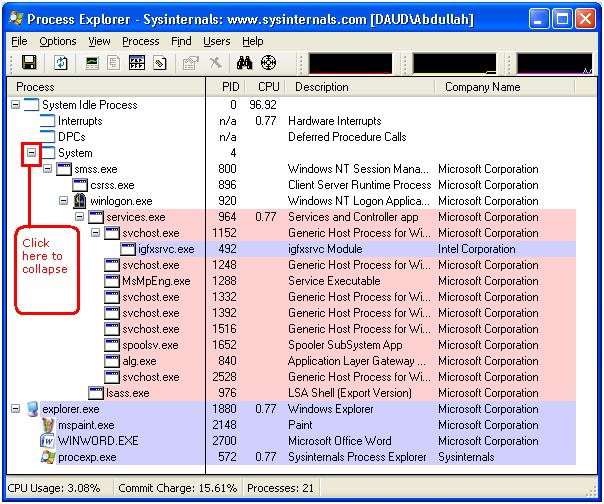
Run process explorer by typing procexp in the start menu

Run and do as illustrated.


1111.jpg

After collapsing
1212.jpg
procexp.exe is Process Explorer’s own process
All the system process are collapsed in the system tree, so if you see a process like winlogon.exe in explorer tree then it is surely a virus
If you do see any suspicious process, Processes can be sought for their suspiciousness at http://www.processlibrary.com/
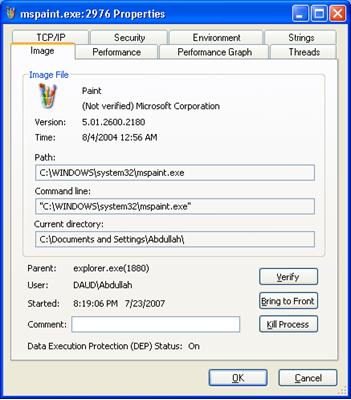
Right click on it if the process is found and then properties. In the path: field copy the path and Open Run Dialogue and paste the path there
Now terminate the suspicious task in process explorer
If the same process starts again then suspend the process by right clicking on it and click suspend on the menu. Remove the name of the application from path now listing only folder.

e.g If you have copied C:\WINDOWS\system32\mspaint.exe then remove mspaint.exe and you will see C:\WINDOWS\system32\ this in the Run Dialogue.
How to Manually Remove Viruses From Your System

2. File Deletion

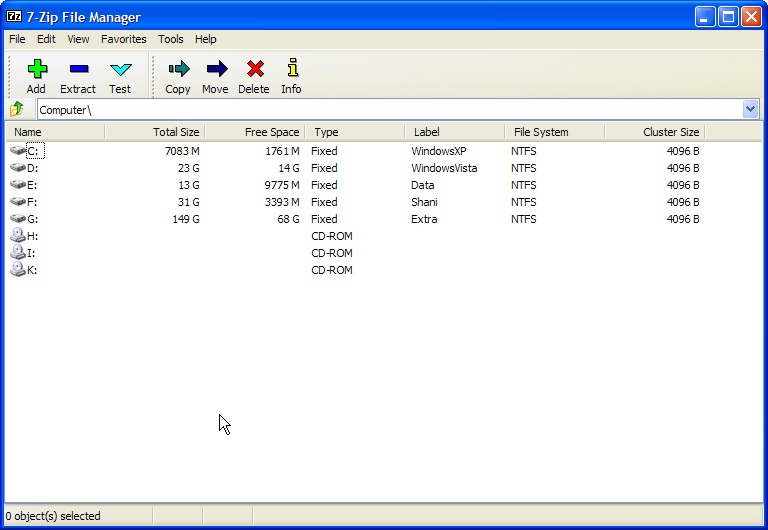
The second step is deleting files. Download 7-ZIP which will show you all hidden files and go through the root path of every drive

screenshot010.jpg

Delete .exe and autorun.inf like

ravmon.exe, smss.exe,Funny UST Scandal.exe

But do not delete these files as these are system files

autoexec.bat, boot.ini, bootmgr,config.sys, io.sys, msdos.sys, ntdetect.com, pagefile.sys,ntldr, hiberfil.sys

3. Removal of startup entries

Now you have successfully terminated virus process the next thing is to remove those virus files which run upon system start.
Open Autoruns by typing autoruns in the Run Dialogue. Wait while refreshing completes.

In the Options –> Hide Microsoft Entries. And click Refresh button on the interface OR Close the program and start again

autoruns.jpg

After scanning completes select Logontab and uncheck all the entries be sure do not unselect any Microsoft Entry.Restart system for the changes to take effect.

4. Restoring Windows Default settings

Use Smart Anti-Virus to restore some settings
Smart Anti-Virus

Now scanning your system for an fully functional Anti-Virus will be the last suggestion as my own Anti-Virus can only catch almost 10 viruses

Troubleshooting

Incase of any problem. you did a wrong move. Open Autoruns, in the Options –> Unselect Hide Microsoft Entries. And click Refresh button on the interface OR and select all entries .Close the program and start your system again.